
Title: Edit the display name on a reel
The Title block displays large text at the top of your reel. It's automatically populated with your reel name, but you can change the display title.
Jump to: Editing the title · Showing or hiding · Common questions
Editing the title
Click the Title block to edit the display text. Type whatever you want to appear on your reel.
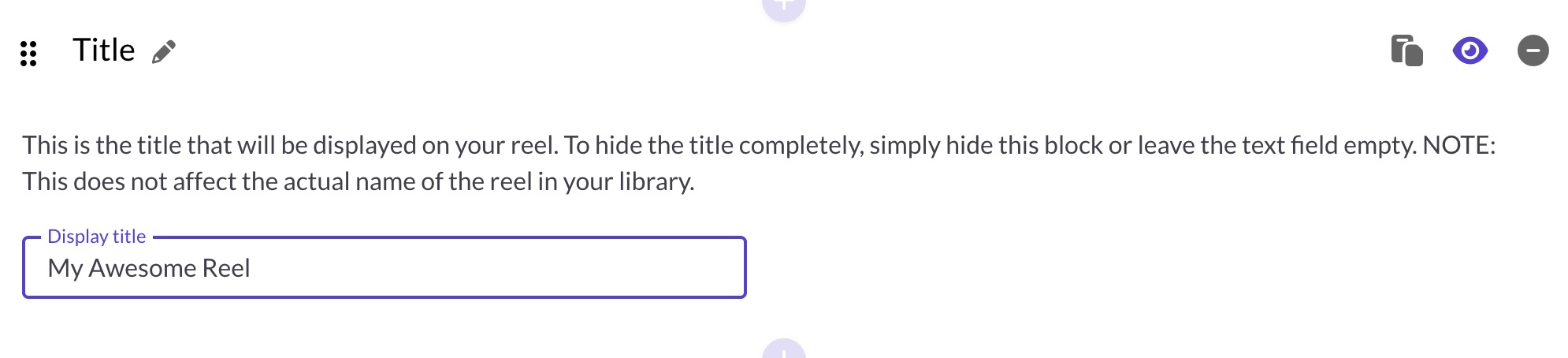
Changing the display title here does not change the reel's name in your library. To rename the reel itself, edit it on the Reel Details page.
Showing or hiding the title
Click the eye icon in the upper right of the block to hide the title from your reel. Click again to show it.
If visible, the Title block text is also used as the default title when sharing your reel on social media or messaging platforms. See Sharing your reel on social media & messaging platforms for more on how previews work.
Common questions
What's the difference between the display title and reel name?
The display title is what viewers see on your reel. The reel name is what you see in your library. They can be different.
Can I add multiple Title blocks?
No, the Title block is limited to one per reel.
Can I format the title text?
The Title block displays plain text in a large font. For formatted text, use a Text block instead.
Does hiding the title affect social sharing?
Yes. If the Title block is hidden, it won't be used for the social preview title. See Sharing your reel on social media & messaging platforms for the full list of fallbacks.