
Control Search Visibility for Your Shared Reels
ReelCrafter links have always been private by default. We never ask search engines like Google to "crawl" or "index" your reels. Only people who have your link can view them.
Search engines can only index pages they can see. If you post your reel publicly, like on your website, a blog, or social media, a search engine could discover that page on its own. With ReelCrafter's Search Visibility settings, you decide what happens next: allow your publicly shared reels to appear in search results, or completely hide them.
Jump to: Why keep indexing on · How it works · Single reel visibility · Default visibility · Disable all indexing · Common questions
Why you might want to keep indexing on
If you intentionally share your reel publicly, for example, as part of your portfolio, on your own website, or in a press feature, you may want search engines to index it.
Allowing indexing can help your reel appear in search results, which makes it easier for people (like potential clients, collaborators, or employers) to discover your work.
If your reel is meant to be private or limited to specific viewers, keeping indexing off ensures it stays hidden from search engines even if it's linked publicly.
How Search Visibility works
Search Visibility lets you control whether search engines can:
- Index a reel's link (so it could appear in search results)
- Follow any links you include inside your reel
- Index images used in your reel (so they could appear in image search results)
Turning Search Visibility off tells search engines not to include your reel in their search results, even if the link appears on a public page.
Important: ReelCrafter never submits or promotes your links to search engines. This feature simply gives you more control if you share your reel publicly.
Option 1: Control Visibility for a Single Reel
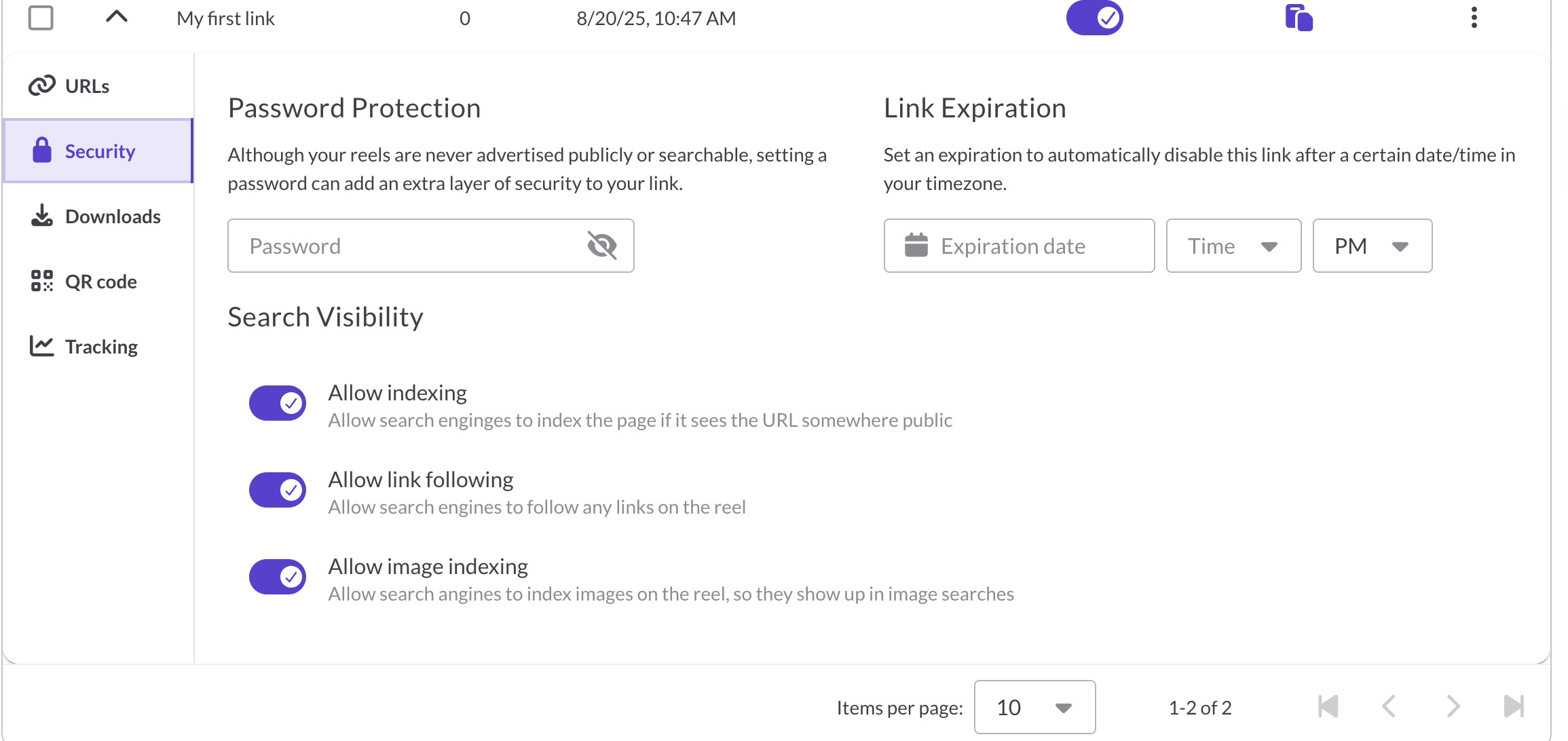
- Expand the settings panel for the share link you want to manage.
- Click the Security tab.
- In the Search Visibility section, turn settings on or off as needed.
Turning all visibility settings off ensures your reel is fully hidden from search engines when it is shared publicly.
Option 2: Set Default Visibility for All New Reels
You can define how new share links behave by default, including whether they allow indexing.
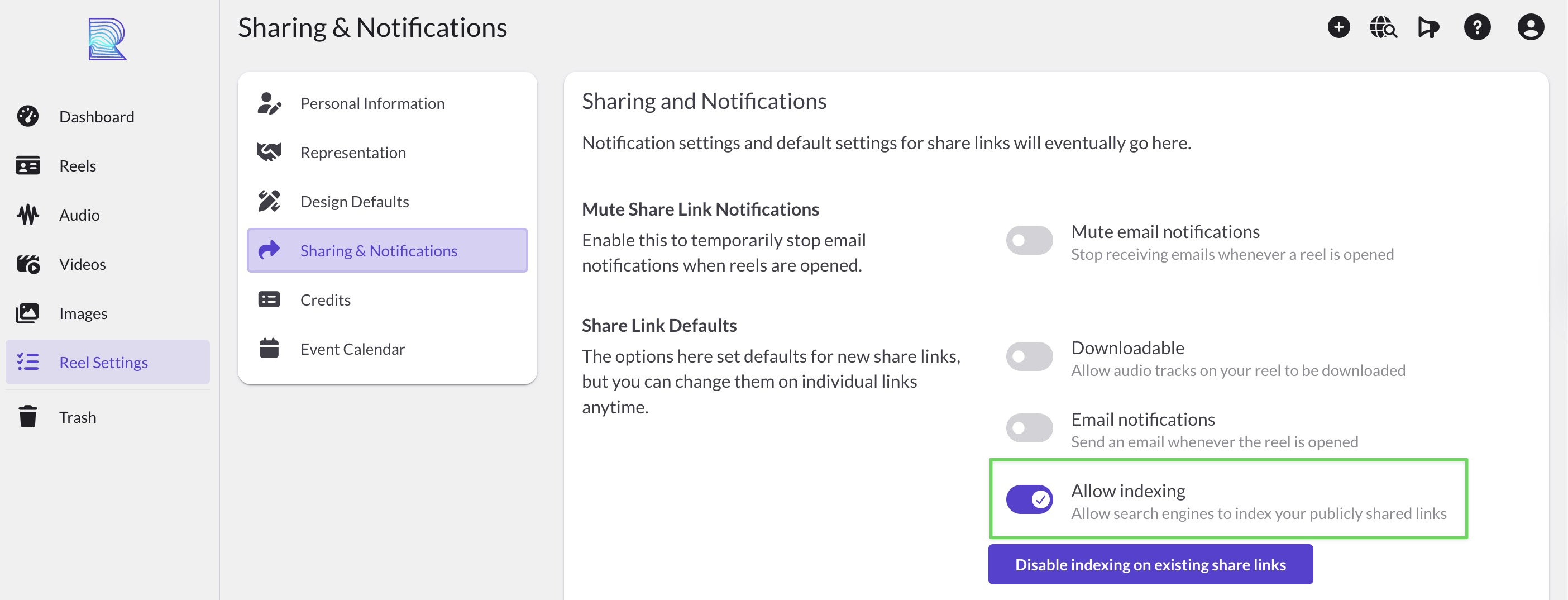
- Go to Reel Settings → Sharing & Notifications.
- Under Share Link Defaults, toggle Allow indexing on or off.
- These defaults apply only to new share links you create (you can still adjust any individual link later).
Option 3: Disable Indexing for All Existing Reels
Want to make sure none of your current publicly shared links can appear in search results?
Use the global disable option:
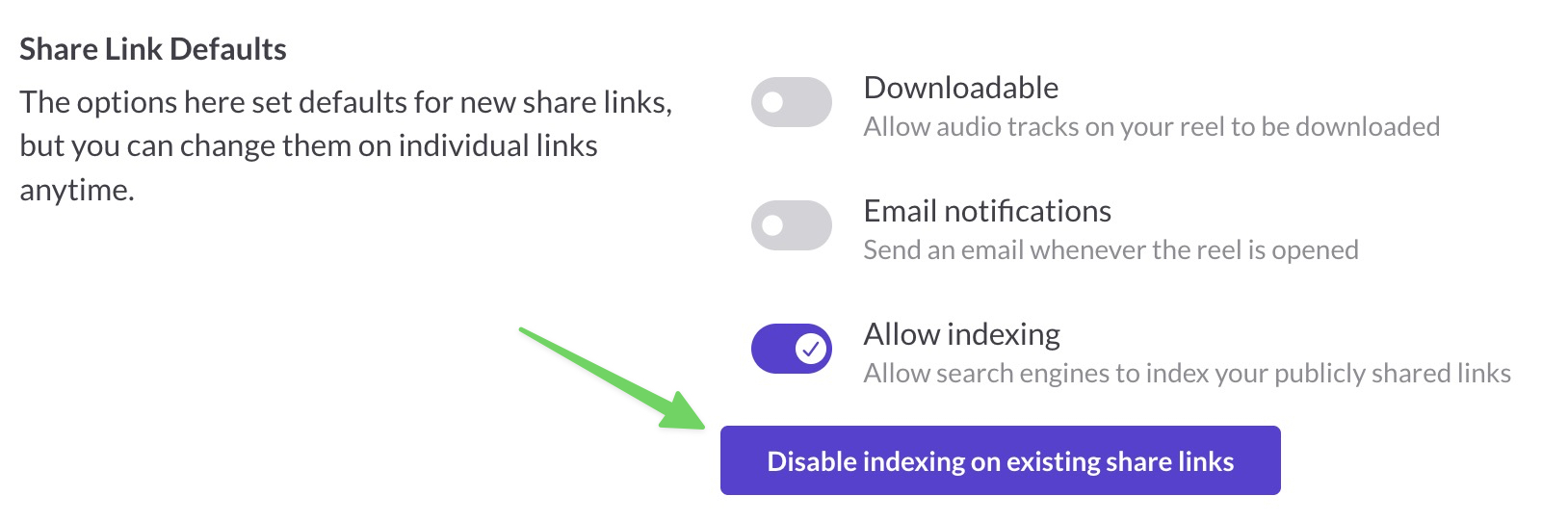
- Go to Reel Settings → Sharing & Notifications.
- Click the Disable indexing on existing share links button.
- This will instantly update all your current share links to block indexing.
Quick Reference
| Task | Where to Find It | Affects |
|---|---|---|
| Turn indexing on/off for a single link | Share Link → Security | One specific share link for a reel |
| Set default behavior for new share links | Reel Settings → Sharing & Notifications | Future reels only |
| Disable indexing for all existing share links | Reel Settings → Sharing & Notifications | All current reels |
Tips
- If you're unsure, keep Allow indexing turned off for maximum privacy.
- You can safely share reels with clients and collaborators: search engines won't find them unless you make them public and enable indexing.
- Changing Search Visibility won't affect anyone's ability to view your reel if they already have the direct link.
Common questions
Does turning off search visibility make my reel private?
No. Anyone with the direct link can still view your reel. Search visibility only controls whether search engines can index the page. For true privacy, use password protection or link expiration.
Will my reel be removed from Google if I turn off indexing?
Turning off indexing tells search engines not to index the page going forward. If your reel was already indexed, it may take time for search engines to remove it from their results.
Which plan do I need for search visibility controls?
Search visibility settings are available on Starter and Professional plans.
Does this affect embedded players?
No. Embedded players are always set to noindex/nofollow, so search engines won't index them regardless of your share link settings. The page containing your embed is controlled by your own website's SEO settings.
Can I turn on indexing for some links and off for others?
Yes. Each share link has its own search visibility settings. You can have one link indexed for your portfolio and another hidden for a private client submission.